How to make an expired Opportunity live

If your opportunity has expired, it will no longer be visible on The Hub for volunteers to find.

You can easily edit the opportunity to make it live again (to save you from having to create a new opportunity).
To make an expired Opportunity live

  1. To sign in, go to doit.life/fareshare
  2. Click ‘Sign In’ on the top right and enter your login details
  3. You will be directed to Your Spaces. (Can’t see this option? Click here for more help)
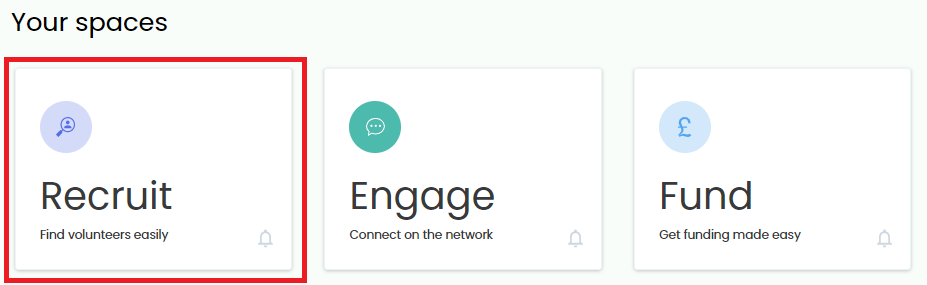
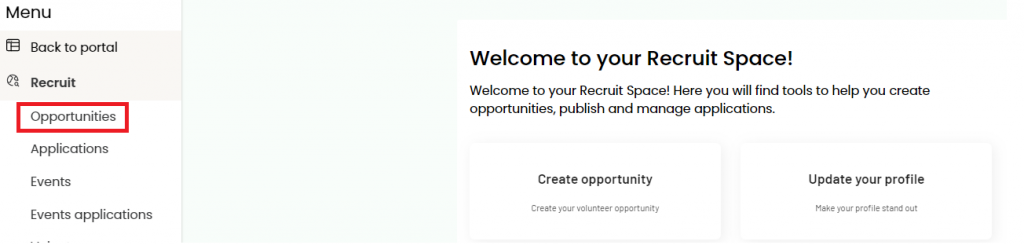
  4. Click ‘Recruit’
  5. Click ‘Opportunities’

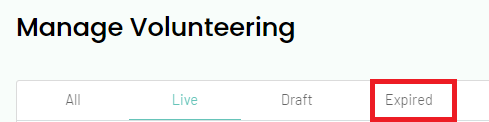
  6. By default, you will see your ‘live’ opportunities. Click ‘Expired’
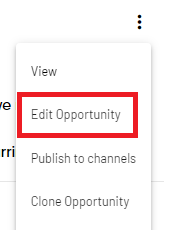
  7. Click the three dots on the right of the opportunity you wish to update
  8. Select ‘Edit Opportunity’ on the dropdown
  9. You will be directed to the Edit an Opportunity page (where you will see all the details that you originally added for the opportunity)
  10. Scroll down to the Opportunity End Date. Click the calendar icon and select a future date
  11. Click ‘Next’
  12. Publish Until Date – by default, the Publish Until Date will copy the new Opportunity End Date. You can manually update this date should you need.
  13. Click ‘Update Opportunity’

You have now updated your volunteer opportunity to be live. You should be able to see the opportunity listed under your Live Opportunities.